Crews & calendar
Who goes out with whom tomorrow — and who's on leave.
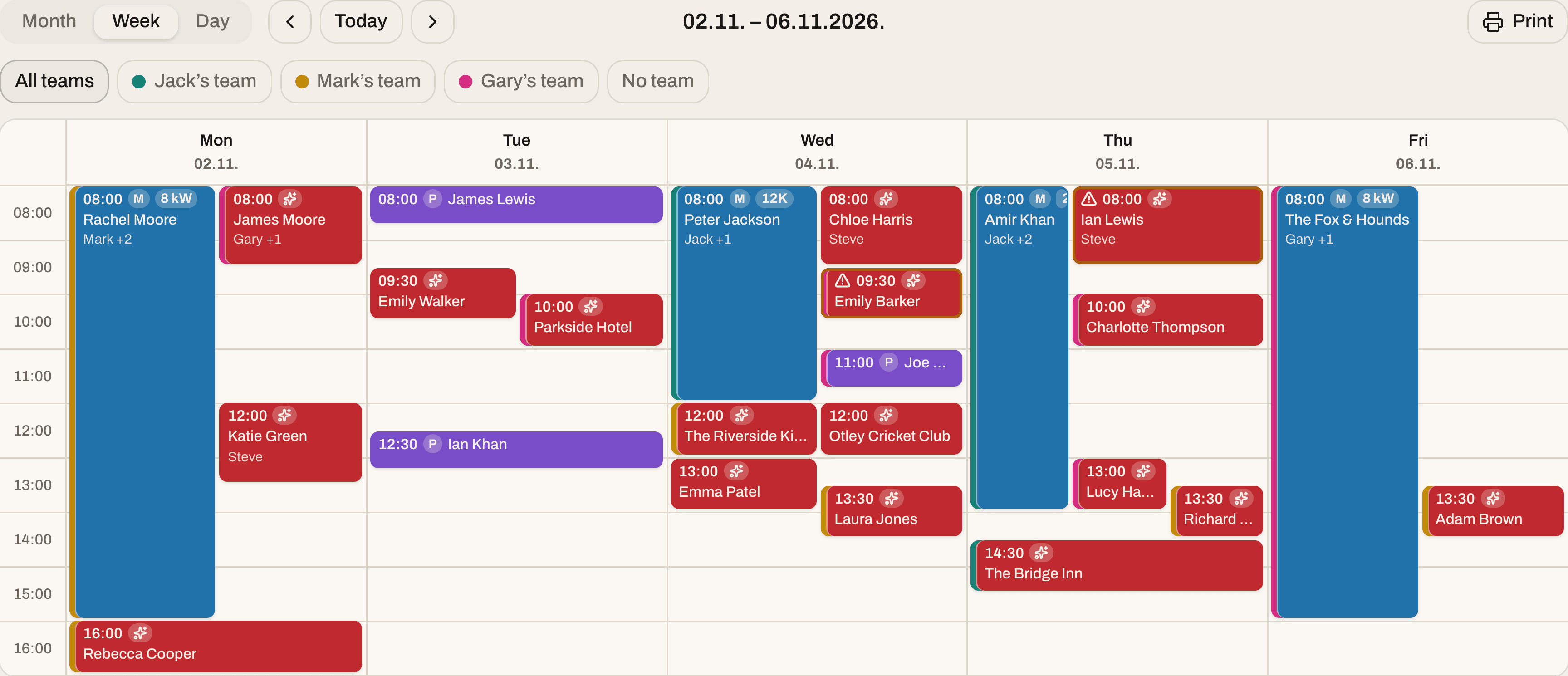
You always know who leads a job and who helps. When someone books leave, you see straight away the jobs they still hold in that period and can change the crew in time. Nothing moves by itself — that decision is yours.
- Service
- Installation
- Inspection
Projects
free for the first 10 firmsAn installation that runs over several days is a project: each visit is an ordinary job in the calendar, and the units are entered once, when everything is done.
What else the schedule makes easier
Move an appointment in one go
Day, week and month. On a computer you just drag the appointment, and the phone has its own week and month views.
Booking without guesswork
The job form suggests the crew’s first free slot within working hours, and the app learns how long jobs take from your completed jobs.
Spot clashes in time
If someone on the crew is on leave or already has a job at the same time, the calendar warns you before you save.
The crew knows who’s where
In the calendar, engineers also see their colleagues’ jobs, without the customer’s phone number and address, and can’t open them. Easier to coordinate, and the data stays protected.
Leave without paperwork
Engineers request leave or a day off themselves, and you decide whether requests need approval.
Teams (add-on)
Permanent teams with a lead and members. In the day view each team has its own column, and a job’s crew fills in from the team with one pick.
Projects (add-on)
An installation over several visits is run as one job: unit list, commissioning per unit, a signed daily report and a final report.
Smart scheduling (add-on)
Less driving: a suggestion to combine a job with another in the same area, and morning suggestions for overdue jobs. Nothing moves by itself.
Your business deserves a better system.
Less admin. More control. More time for customers.